Providing Free and Editor Tested Software Downloads
< HOME | TUTORIALS | GEEK-CADE| WEB TOOLS | YOUTUBE | NEWSLETTER | DEALS! | FORUMS | >

MajorGeeks.com - Drop down and tweak it!

Software Categories

All In One Tweaks
Android
Antivirus & Malware
Appearance
Back Up
Browsers
CD\DVD\Blu-Ray
Covert Ops
Drivers
Drives (SSD, HDD, USB)
Games
Graphics & Photos
Internet Tools
Linux Distros
MajorGeeks Windows Tweaks
Multimedia
Networking
Office & Productivity
System Tools

Other news

· How To and Tutorials
· Life Hacks and Reviews
· Way Off Base
· MajorGeeks Deals
· News
· Off Base
· Reviews


Opera One
Everything
you need.
Already
there.
AI assistant
Aria, built right in
Free VPN
No account needed
Ad blocker
Faster, cleaner web
Tab Islands
Grouped browsing
Useful sidebars
Make it yours
No Clunky Extensions Needed.


MajorGeeks Approved.


Download free

spread the word

· YouTube
· Facebook
· Instagram
· Twitter
· Pintrest
· RSS/XML Feeds
· News Blur
· Yahoo
· Symbaloo

about

· Top Freeware Picks
· Malware Removal
· Geektionary
· Useful Links
· About Us
· Copyright
· Privacy
· Terms of Service
· How to Uninstall

top downloads

1. GS Auto Clicker
2. Smart Defrag
3. Macrium Reflect FREE Edition
4. K-Lite Mega Codec Pack
5. MusicBee
6. Microsoft Visual C++ 2015-2022 Redistributable Package
7. Sergei Strelec's WinPE
8. K-Lite Codec Pack Full
9. Visual C++ Redistributable Runtimes AIO Repack
10. McAfee Removal Tool (MCPR)
More >>

top reads

Star How Much Storage Space Are Your Installed Apps Using in Windows 11?

Star How To Reset and Fix the Settings App in Windows 11

Star How To Remove the Windows 11 Updated Start Menu

Star How To Download a Windows 11 ISO

Star How To Disable Drag Tray

Star How To Boot Into WinRE (Windows Recovery Environment)

Star How To Find the Installation Date of Apps

Star Recently Opened Files - How To Hide or Show Them In Jump Lists, File Explorer, and Start Menu

Star How To Change the Name of a Local or Microsoft Account

Star How To Remove OneDrive From the Navigation Pane in File Explorer


MajorGeeks.Com » News » April 2012 » Doctor Web disputes “significant decrease” in Mac Flashback Malware

Doctor Web disputes “significant decrease” in Mac Flashback Malware


Contributed by: Email on 04/21/2012 03:53 AM [ comments Comments ]


Some industry leaders are now claiming that the Backdoor.Flashback.39 bot number has been significantly decreased but the researchers at Doctor Web dispute this.

Who to believe?

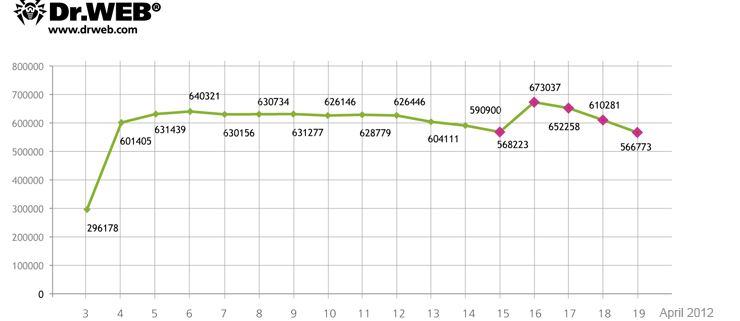
“According to Doctor Web, 817 879 bots connected to the BackDoor.Flashback.39 botnet at one time or another and average 550 000 infected machines interact with a control server on a 24 hour basis. On April 16, 717004 unique IP-addresses and 595816 Mac UUIDs were registered on the BackDoor.Flashback.39 botnet while on April 17 the figures were 714 483 unique IPs and 582405 UUIDs. At the same time infected computers, that have not been registered on the BackDoor.Flashback.39 network before, join the botnet every day. The chart below shows how the number of bots on the BackDoor.Flashback.39 botnet has been changing from April 3 to April 19, 2012.”


(Image courtesy of Doctor Web)

Those of us geeks can see why this makes sense. I have heard from so many people that they were considering a Mac for their next computer because they don’t get viruses. I have explained to them that it is simply a numbers game. Macintosh has on average 5% of the market and PC has the rest. Most Mac users tend to be savvy and use the internet safer than the average PC user. There isn’t a lot of money to be made chasing around 5% of the market share. My assumption would be that a lot of these infected computers belong to people who bought a “virus safe” Macintosh in the last couple of years.

Whether you are a PC user or a Mac user, one rule always applies. Update your computer when asked. Vulnerabilities are always a big factor when you use Adobe Flash, Javas and other internet based programs. It’s not the computer; it’s the user that determines how safe you are.

Doctor Web once gain warns Mac OS X users of the BackDoor.Flashback.39 threat and strongly recommends you to install Java updates and scan the system to determine whether it has been infected. For more information about BackDoor.Flashback detection and neutralization visit https://www.drweb.com/flashback/. To remove the Trojan, you can use Dr.Web for Mac OS X Light available free of charge.


« Daily Reviews Summary 04/21/12 (27 Reviews) @ NT Compatible · Doctor Web disputes “significant decrease” in Mac Flashback Malware · AMD Reports First Quarter Results »


Comments
comments powered by Disqus

MajorGeeks.Com » News » April 2012 » Doctor Web disputes “significant decrease” in Mac Flashback Malware

© 2000-2026 MajorGeeks.com
Powered by Contentteller® Business Edition